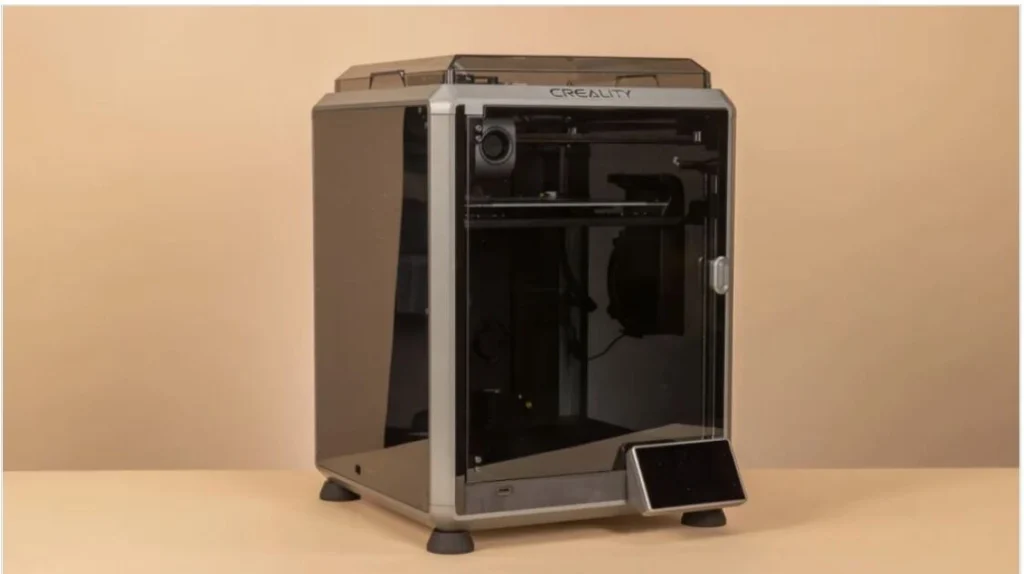
Desktop 3D printers have become easier to use, more affordable, and capable of producing far more than simple models. They can now make detailed miniatures, replacement parts, engineering prototypes, large objects, and functional components. After testing dozens of machines, the key advice is to choose based on what you plan to make—not just the printer’s price or headline specifications.
Recommended 3D printers
- Best overall: Bambu Lab P2S — Combines excellent print quality and reliability with fast motion, automatic calibration, helpful monitoring, and support for a range of filaments. It’s approachable for beginners but capable enough for experienced makers. Its large footprint and limited third-party modification options are drawbacks.
- Best budget filament printer: Qidi Q2 — A reasonably priced enclosed printer with active chamber heating, broad material support, and automatic leveling. Its stock profiles may need fine-tuning, and its software could be more polished.
- Best affordable multicolor printer: Bambu Lab A1 mini — A quick, beginner-friendly printer that produces good results and can support four-color printing with an optional accessory. Its build area is small, and multicolor jobs generate filament waste.
- Best mainstream multicolor printer: Snapmaker U1 — Uses four separate toolheads to switch materials and colors, helping reduce waste. It supports a wide range of filaments and offers automatic calibration; heat-sensitive materials require an optional accessory.
- Best pro-level multicolor printer: Bambu Lab X2D — Adds a heated chamber and dual-nozzle system to Bambu Lab’s established workflow, improving multi-material printing and reducing purge waste. Its secondary nozzle is slower and less precise than the main one.
- Best budget resin printer: Elegoo Mars 5 Ultra — Offers detailed 9K prints, automatic leveling, and a tilting resin vat that can reduce print failures. Its interface and resin-handling design could be improved.
- Best mainstream resin printer: Formlabs Form Studio 1 — A well-integrated resin system with guided software, automatic leveling, and an easy-to-follow workflow. Optional accessories can raise the total cost.
- Best budget large-format printer: Elegoo Neptune 4 Plus — Prints large objects at a modest price and supports several filament types. It takes up considerable space and requires basic assembly.
- Best professional large-format printer: Ultimaker S5 — A professional machine with dual extruders, a large build area, and straightforward operation. It is expensive and relatively slow at its default resolution.
- Best for kids: Toybox Alpha Three — Designed for simple, largely one-touch printing, with a curated library of projects. Its build volume and material options are limited, and filament and content can add ongoing costs.
- Best UV printer: EufyMake E1 — Prints full-color graphics and raised textures directly onto surfaces such as wood, metal, acrylic, and leather. Its specialized ink is costly.
Start with the projects you want to make
Build volume affects what you can print and how often you’ll need to split models into sections and assemble them afterward. A conventional desktop printer is generally sufficient for miniatures, organizers, small repairs, and prototypes. Larger machines can produce oversized parts and furniture components in fewer pieces, but they take up more room, use more material, and make failed long prints more costly.
Bigger isn’t automatically better. Consider the size of your usual projects, the space available, and whether large prints are worth the additional time and material.
Pick materials for the job
PLA is an easy, inexpensive starting point for decorative pieces, toys, and prototypes. For many functional household parts, PETG offers a useful mix of strength, flexibility, and weather resistance. For outdoor use, ASA stands up better to sunlight and temperature changes than ABS. Enclosed printers can also handle demanding materials such as nylon and polycarbonate, which are useful for parts that need greater toughness or heat resistance.
Resin printers are a strong choice when fine detail and smooth surfaces matter, including for miniatures, jewelry masters, dental models, and prototypes. Resin types can also offer specialized properties such as flexibility, toughness, transparency, and heat resistance. The right choice depends on the finished part’s intended use.
Don’t choose by resolution alone
Layer height is only one factor in print quality. Motion control, frame stability, extrusion, cooling, calibration, software, and material all affect the result. For many functional prints, a standard layer height is sufficient; finer layers can improve decorative details but often increase print time.
Nozzle size matters for filament printers, too. A wider nozzle can speed up large functional parts, while a narrower one can capture fine features. Resin printers typically provide more detail than filament machines, although the gap has narrowed as FDM print quality has improved.
Multicolor printing can also mean multiple materials
Many systems feed several filaments through one nozzle, automatically switching between them. This makes color printing convenient, but the printer must purge material during changes, creating waste. Other machines use multiple toolheads, which can reduce purging and make it easier to combine different materials in a single print.
Multicolor capability is useful for presentation models, educational projects, and finished products. But if your priority is functional parts, a larger build area, an enclosed chamber, or broader material support may be a better investment.
Build plates, frames, and connectivity
Automatic bed leveling and nozzle-height calibration have made successful first layers much easier to achieve. Flexible PEI build plates are common because they hold prints during a job and make removal easier afterward. Materials such as ABS, ASA, nylon, and polycarbonate benefit from heated beds and enclosed chambers that help limit warping.
Open-frame printers are often less expensive and easier to access, and they work well for PLA and PETG. Enclosed models help maintain a stable temperature for engineering materials, reduce noise, and keep dust away. Choose an enclosure based on the materials and projects you expect to use—not appearance alone.
Wi-Fi, camera monitoring, and mobile notifications can make long print jobs easier to manage. Check whether a printer relies on cloud services or supports local-only operation, especially if you’re printing sensitive designs or using it in a school or workplace.
Consider the software ecosystem
Slicing software prepares a model for printing, generates supports, estimates material use, and lets you adjust print settings. The quality of the software, mobile tools, material profiles, firmware updates, and manufacturer support can have a major effect on everyday use.
Before buying, explore the printer’s slicer and workflow. A machine’s specifications matter, but so does how easy it is to prepare, send, and monitor prints.
For a broader introduction, see this guide to getting started with 3D printing and the 3D printer filament guide.