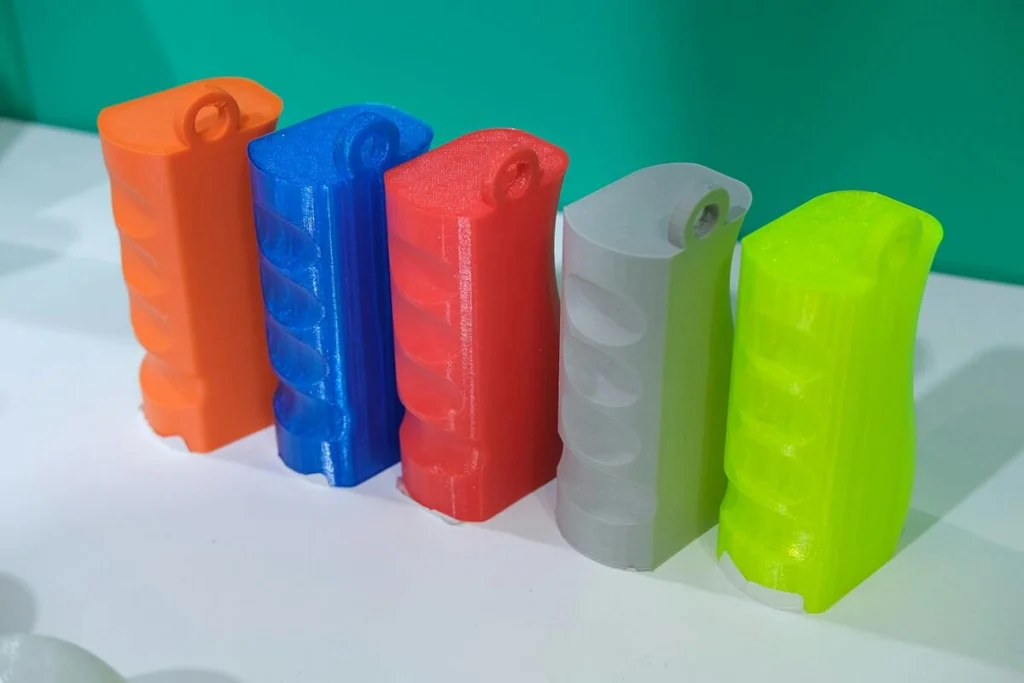
Flexible filaments let 3D printers produce parts that bend, stretch, compress, and recover their shape. They’re used for items such as phone cases, grips, seals, protective covers, shoe components, and cushioning structures.
Printing these materials can be trickier than printing PLA. Flexible filament may buckle in the extruder, string between features, or produce uneven layers because it responds differently to pressure, heat, and moisture. Understanding the material and tuning the printer accordingly can make results more reliable.
TPU and TPE: What’s the Difference?
TPE, or thermoplastic elastomer, is a broad family of materials that combines rubber-like flexibility with the processing characteristics of thermoplastics. TPU, or thermoplastic polyurethane, is one type of TPE.
Many TPU formulations offer a useful mix of flexibility, tensile strength, tear resistance, and abrasion resistance. Other filaments sold as TPE can differ in softness, rebound, recovery, and printability. The label alone doesn’t determine how a filament will perform: formulations vary, even when products have the same nominal Shore hardness.
For example, eSUN’s published data for TPU-95A reports a tensile strength of 35 MPa and elongation at break of at least 800% under its specified test method. Those figures apply to that product, not to all TPU filaments.
Why Flexible Filaments Can Be Difficult to Print
In FFF/FDM printing, drive gears push filament toward a heated nozzle. Rigid filament generally holds its shape under pressure, while flexible filament can compress, stretch, or bend—especially if the feeding path has too much clearance or friction.
If the filament deforms before reaching the hot end, the extruder may turn without delivering material consistently. This can cause under-extrusion, gaps, or print failure.
Direct-drive extruders often make flexible filament easier to feed because the drive gears sit close to the hot end, leaving less unsupported filament. Bowden printers can also print flexible materials, particularly firmer grades, but their longer feed paths may require slower speeds and more careful tuning.
Flexible material can also sag after leaving the nozzle, depending on its formulation, temperature, and cooling. Start by stabilizing the feed, then adjust speed, retraction, temperature, and cooling.
Five Tips for Better Flexible Filament Printing
1. Dry the filament
Moisture can cause popping sounds, bubbles, rough surfaces, and inconsistent extrusion. It may also worsen stringing, though stringing has other possible causes.
Drying requirements vary by filament. Follow the manufacturer’s guidance for the specific product. For example, eSUN recommends drying its TPU-95A at 55°C for more than four hours, and its TPE-95A at 60°C for five to seven hours. These are product-specific instructions, not universal settings.
After drying, store the spool in a sealed container with desiccant. In humid conditions or during long prints, a dry storage box can help maintain consistent material.
2. Check the feeding path
Make sure the spool turns freely and the filament passes through guides without sharp bends or obstructions. Set the drive-gear tension carefully: too little can cause slipping, while too much can flatten or damage soft filament.
Direct drive is generally a good starting point for flexible materials. If using a Bowden printer, slower speeds may help. Around 20–30 mm/s is a reasonable baseline for a printer that struggles with flexible filament, but the right speed depends on the machine and material.
If the extruder clicks, the filament buckles, or flow becomes intermittent, inspect the feed path before changing other settings.
3. Start slowly
A conservative speed—often around 20–30 mm/s—is a useful starting point. Once extrusion is consistent, increase speed in small steps and watch for gaps or uneven lines.
The ideal speed also depends on nozzle diameter, layer height, line width, and hot-end capacity. A filament that works quickly on one printer may need to run much slower on another.
4. Use retraction carefully
Retraction pulls filament back during travel moves to limit unwanted flow. Excessive retraction can stretch or deform flexible material inside the extruder, contributing to jams or inconsistent extrusion.
For direct-drive printers, try a starting distance of about 0.5–1.0 mm, beginning at the lower end. Bowden systems may need different settings. If stringing continues, check moisture and temperature before increasing retraction aggressively.
5. Plan for overhangs and supports
Flexible filament can sag across unsupported gaps before it cools enough to hold its shape. Reduce unsupported spans, adjust model orientation, and tune cooling for the specific material.
Supports can be difficult to remove if they bond strongly to the part. Adjusting the support-interface gap may help, though a larger gap can leave a rougher underside. When possible, design or orient the model to reduce supports, and test settings on a small section first.
What the Numbers Tell You
Hardness is a common first comparison, but two filaments with the same nominal Shore hardness can behave differently under tension, bending, compression, and repeated impact.
One example is eSUN’s TPU-95A and TPE-95A. Both are marketed at Shore 95A, but the manufacturer’s published comparison reports different results:
| Mechanical property | eSUN TPU-95A | eSUN TPE-95A |
|---|---|---|
| Tensile strength, XY axis | 29.63 MPa | 21 MPa |
| Tensile strength, Z axis | 4.43 MPa | 8 MPa |
| Elongation at break, XY axis | >400% | ≥450% |
| Elongation at break, Z axis | 35.66% | ≥75% |
| Rebound resilience | Not reported | 58% |
Source: eSUN’s published comparison data for TPU-95A and TPE-95A.
These measurements describe different properties:
- Tensile strength measures resistance to pulling. Results can vary by direction because printed parts are built in layers. These figures apply to the specific products and test conditions—not to TPU and TPE as entire material categories.
- Elongation at break measures how far a specimen stretches before it breaks. It doesn’t, by itself, show how well the material returns to its original shape after repeated deformation.
- Rebound resilience describes how much energy a material returns after deformation under a specified test. It can be useful for cushioning applications, but it isn’t the same as elongation or full shape recovery.
No single figure fully characterizes a flexible filament. Consider the properties that matter for the intended part, and compare products using their specific technical data.
Choosing a Filament for the Application
- Protective covers, grips, and parts exposed to friction: TPU is a common choice because many formulations combine flexibility with tear and abrasion resistance.
- Cushioning and repeated deformation: Check rebound resilience, compression set, and fatigue resistance—not just hardness.
- Parts that stretch substantially: Elongation at break can help with comparison, but tear resistance and repeated-use recovery are separate considerations.
- Wearable accessories and soft-touch parts: Consider hardness, surface texture, and how the finished print feels. Shore hardness alone doesn’t fully predict that experience.
- Outdoor or chemically demanding uses: Check temperature limits, UV resistance, chemical compatibility, and aging performance. These vary by formulation and shouldn’t be assumed from the material name.
Printability matters, too. A material may have suitable mechanical properties but be difficult to use on a printer that can’t feed it consistently. A small test print can help confirm that the filament and machine work well together.
A Simple Troubleshooting Workflow
When a flexible print fails, change one thing at a time:
- Check for moisture. Look for popping, bubbles, or rough extrusion, then dry the filament according to the manufacturer’s instructions.
- Inspect the feed path. Check spool rotation, guides, drive-gear tension, and obstructions.
- Reduce print speed. Return to a conservative speed and see whether extrusion becomes more consistent.
- Review retraction. Reduce excessive distance or speed and test again.
- Adjust temperature and cooling. Make small changes within the filament’s recommended range.
- Review the model. Reduce unsupported spans, reorient the part, or refine support settings if sagging or support removal remains a problem.
Conclusion
Reliable flexible-filament printing depends on the material, printer, and part design working together. Keeping filament dry, reducing feed resistance, starting slowly, and using retraction carefully can resolve many common issues.
TPU is one member of the broader TPE family, and different formulations can offer different combinations of hardness, rebound, durability, and printability. Compare product-specific data, understand what each measurement means, and test the material on your printer before committing to a full print.