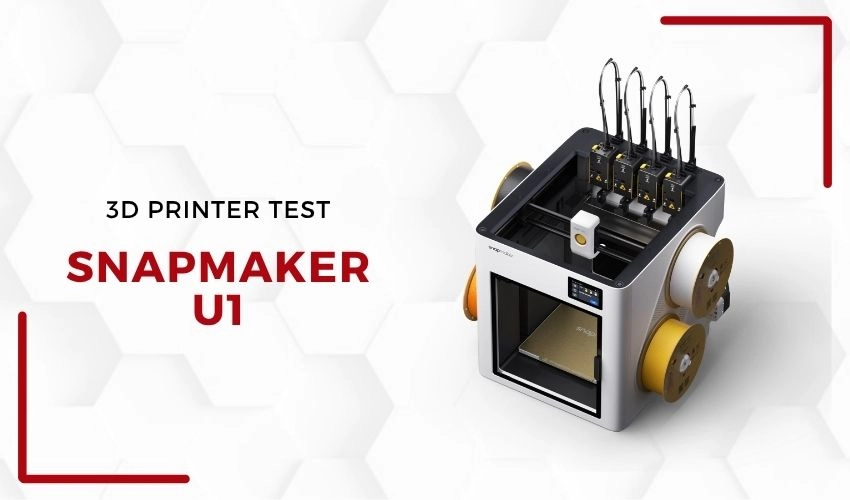
Long recognized for creating versatile digital fabrication machines that combine 3D printing, CNC machining, and laser engraving in one device, Snapmaker is shifting its strategy. Following the success of models like Snapmaker 2.0 and Artisan, the brand is focusing more on dedicated 3D printers, departing from its previous "all-in-one" approach. The U1 is a prime example of this transition, specifically designed for multi-material 3D printing and equipped with a four-tool automatic print head switching system.
The U1 was initially funded through Kickstarter and it is entering a competitive market alongside established competitors like Bambu Lab, Prusa Research, and Creality. Its standout feature is a mechanical tool changer that significantly minimizes filament waste compared to traditional purge-and-load systems. We tested this machine at the 3Dnatives Lab to assess its performance in practice.
Unboxing and Technical Specifications
The U1 has a modern, minimalist aesthetic with a clean look due to its injection-molded plastic panels. While this change from a metal build may appear less robust, the design effectively maintains structural integrity and print quality. Notably, the USB port for file transfers is located at the rear, which can be awkward to access despite the machine’s thoughtful side panel design.
The four exposed filament slots lack built-in drying capabilities, presenting a potential concern for those working in humid conditions or with hygroscopic materials. The onboard lighting is functional but can struggle in low-light conditions, affecting the usability of its integrated camera.
Installation and Setup
Installing the U1 primarily involves attaching the four print heads to the tool changer and connecting the necessary cables, with the process taking around 30-45 minutes for experienced users. Although the machine isn’t a kit, it requires a certain level of technical skill for assembly. Users will appreciate the detailed quick start guide, though some ambiguity around the installation of different PTFE tube sizes could create confusion.
Calibration is user-friendly, guided through a 3.5-inch color touchscreen. The responsive interface makes it easy to level the build plate and calibrate tool offsets, ensuring reliable multi-head transitions right from the start. However, the fixed screen position may become uncomfortable based on where the machine is placed.
Software and Applications
The U1 operates on Klipper firmware combined with Fluidd, allowing for extensive customization and flexibility that appeals to the technical community. Users can access Fluidd via their local network and take advantage of the slicer, Snapmaker Orca, which is adapted from OrcaSlicer with profiles specific to the U1. This provides a straightforward tool management experience, although using third-party filaments requires manual input.
The mobile app lacks some capabilities found in competitor ecosystems, limiting users from starting prints directly from their devices. Reports of connectivity issues with the app indicate that software integration is an area needing improvement.
First 3D Prints
The hallmark of the U1 is its four-head tool changer system, allowing for quick mechanical transitions with minimal filament waste. Our multi-color print tests yielded impressive results, showing clean transitions and minimal material loss. However, TPU printing proved problematic, highlighting the challenges many multi-extruder setups face with flexible filaments.
One notable design drawback is that the nozzle units, which integrate the heating block and temperature sensor, require complete replacement rather than just changing out the nozzle itself. This aspect could lead to higher operational costs for users experimenting with different materials.
Conclusion
Score: 9/10
The Snapmaker U1 effectively makes multi-material 3D printing more accessible through its reliable mechanical system at an attractive price point. Its Klipper/Fluidd software framework allows for customization, making it ideal for makers and educational institutions.
That said, it may not be the best fit for users looking for a fully optimized out-of-the-box experience. Some design inconsistencies and limited software functionality should be considered by potential buyers. Overall, for those unafraid to experiment and configure, the U1 stands out as one of the most compelling options for those seeking a multi-material tool changer that doesn’t skimp on performance.