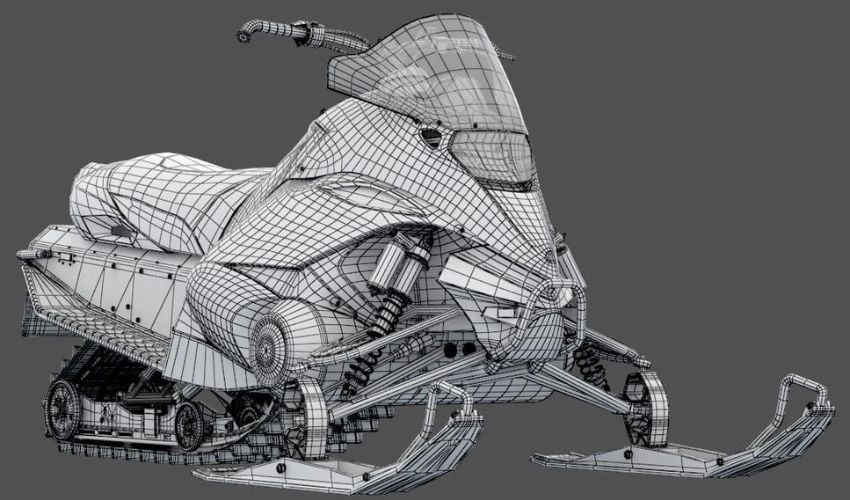
Polygons are fundamental in 3D modeling, enabling the creation of intricate designs with precision. They serve as the building blocks for 3D objects, comprised of simple geometric shapes that form complex structures suitable for 3D printing. This guide explains how polygons function, their application in modeling, and their significance in the 3D printing process.
Understanding Polygons
A polygon is a two-dimensional shape that forms the basis of 3D meshes. These shapes are defined by vertices—points in three-dimensional space—connected by edges. The most common polygon is a triangle, formed by three vertices. Other shapes, like quadrilaterals, can also be used but should maintain a minimum of three vertices. Creating a 3D object involves assembling multiple polygons, resulting in a mesh-like appearance.
Components of a Polygon
Each polygon consists of several critical parts:
- Vertices: Points where edges meet; moving a vertex alters the shape.
- Edges: Lines connecting vertices; changes to edges modify the entire polygon.
- Surfaces/Faces: Flat, closed areas formed by edges; reshaping a face impacts the associated vertices and edges.
These elements work together, ensuring that changes to one affect the whole geometry of the model.
Modeling Techniques
Significant polygonal modeling techniques include:
- Extrusion: This moves a part of a mesh outward or inward, adding volume while remaining connected to the original shape.
- Subdivision: This technique divides faces into smaller portions, increasing mesh density and creating smoother surfaces for enhanced realism.
- Beveling: This process softens sharp edges, making transitions appear more natural. However, improper bevel management can disrupt mesh topology.
Polygon Density
In modeling, high-poly and low-poly models are distinguished by their polygon count:
- High-poly models contain a dense network of polygons for detailed visualization but require substantial computational resources.
- Low-poly models use fewer polygons, making them suitable for graphics and animations due to their efficiency. Techniques like retopology can reduce complexity while maintaining visual fidelity by simplifying meshes and applying textures instead of additional geometry.
Challenges and Benefits of Polygonal Modeling
Polygons are straightforward to manipulate, which accelerates the modeling process. They offer compatibility with texture mapping, allowing for surface appearances to be altered without reconfiguring the underlying geometry. However, high-detail models can lead to larger file sizes and increased computations. Modeling organic shapes with polygons can also be challenging due to their straight edges, which limit the smoothness necessary for curves.
Importance for 3D Printing
The arrangement and number of polygons directly impact print quality and processing speed. High-density models can be computationally taxing, while overly simplified models might lack necessary detail. Therefore, optimizing polygon counts while preserving essential features strikes a balance between quality and efficiency. Ensure proper polygon orientation to avoid printing errors.
Available Software
Several programs facilitate polygonal modeling, simplifying the workflow:
- Substance 3D Modeler: Leverages voxel tech for detailed models while incorporating polygonal aspects.
- Polygonica: Specializes in managing complex 3D models and optimizing polygonal meshes.
- Figuro: Focuses on modeling and optimizing meshes for 3D printing.
- General-purpose software like Maya, Blender, and 3ds Max also provide robust tools for polygonal modeling.
In summary, understanding polygonal modeling is crucial for anyone involved in 3D printing. It enhances the process of creating high-quality, detailed models while balancing the requirements for computational efficiency and print fidelity.